
Part 3 of 3. ← Part 1 — the unreasonable reality. ← Part 2 — accounts, config, opusplan, context management.
CLAUDE.md — the highest-ROI investment
CLAUDE.md is a file in your project root that Claude Code reads on every launch. Put your stack, directory structure, dev commands, code style in it, and it won't spend tokens re-exploring each time. Community consensus: a good CLAUDE.md cuts 30–40% of token consumption.
But many people write it too long. The consensus is to keep it under 200 lines — beyond that, Claude starts ignoring your instructions uniformly (not just the last ones — all of them, more). Claude Code's own system prompt already takes ~50 instructions, leaving you ~100–150 effective instruction slots.
/init is your starting point. Available across models, it analyses your codebase, detects build system and test framework, and auto-generates a CLAUDE.md draft. A good /init output covers ~80% of the project's key structure.
After generating, do two things: delete redundancy, add specifics.
Delete criterion: if removing a line doesn't make Claude err, remove it. Add the things /init can't cover — usage instructions for your common MCP tools ("screenshot with the ios-simulator MCP, not manual simctl"), team-specific style notes ("all commit messages in English"), and corrections for mistakes Claude tends to make ("no any type, use generics").
Maintain CLAUDE.md like an onboarding doc for a new hire — "what is this project, how do you run it, what's allowed and what isn't" is enough.
MCP — install what matches your runtime
ios-simulator-mcp: lets Claude drive the iOS simulator — screenshot, tap, swipe.
MCP (Model Context Protocol) servers give Claude external tool access. The core principle: install MCPs directly relevant to your runtime, not a pile you'll never use.
For Mana's iOS development, I installed two key MCPs:
- ios-simulator-mcp. Lets Claude operate the iOS simulator — screenshot, inspect UI hierarchy, tap, swipe, type, set GPS. Most useful: after Claude edits a UI component, it auto-screenshots to check the result — no manually opening the simulator. This is the "give Claude verification ability" point.
- XcodeBuildMCP. Lets Claude control the full Xcode build pipeline — build, test, debug, deploy. 59 tools covering simulator/build-and-run through debugging/breakpoint. Configured, Claude can autonomously run edit → compile → test → find error → fix → recompile without you switching windows.
Install:
claude mcp add ios-simulator npx ios-simulator-mcp
claude mcp add xcodebuild npx xcodebuildmcp
But remember: every additional MCP server eats another chunk of context for tool descriptions. ios-simulator-mcp brings a dozen tool definitions; XcodeBuildMCP has 59. Install a dozen MCPs and use two or three — the rest is burning money.
My approach: keep only genuinely high-frequency MCPs resident, load others on demand. XcodeBuildMCP supports selective workflow loading via config (simulator / ui-automation / debugging) — no need to open everything.
Same logic for other stacks — install what's directly bound to your stack:
- Web frontend → Chrome DevTools MCP, so Claude opens a browser to check the result.
- Backend → database MCP, so Claude queries tables to verify data.
- React Native → ios-simulator-mcp + Android simulator MCP, both.
Anatomy of the .claude folder — your AI control centre
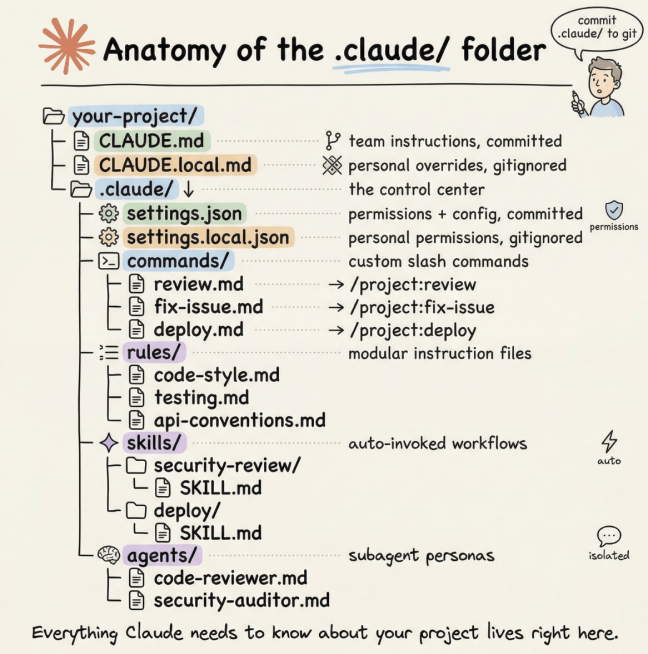
The full .claude/ folder structure (source: Avi Chawla / Daily Dose of Data Science).
Many people treat the project's .claude/ folder as a black box — know it exists, never open it. Huge waste. .claude/ is Claude Code's entire behaviour-control centre in your project. (This section draws on Avi Chawla's deep dive — recommended: blog.dailydoseofds.com/p/anatomy-of-the-claude-folder.)
First: there are two .claude directories, not one.
- Project-level
your-project/.claude/— team config, committed to git, shared by everyone. - Global
~/.claude/— your personal preferences and machine-local state (session history, auto-memory).
Full structure:
your-project/
├── CLAUDE.md                  # team instructions (committed)
├── CLAUDE.local.md            # personal overrides (gitignored)
│
└── .claude/
    ├── settings.json          # permissions + config (committed)
    ├── settings.local.json    # personal permission overrides (gitignored)
    ├── commands/              # custom slash commands
    │   ├── review.md          # → /project:review
    │   └── smart-commit.md    # → /project:smart-commit
    ├── rules/                 # modular instruction files
    │   ├── code-style.md
    │   ├── testing.md
    │   └── api-conventions.md
    ├── skills/                # auto-triggered workflows
    │   └── security-review/
    │       └── SKILL.md
    └── agents/                # specialised sub-agent personas
        ├── code-reviewer.md
        └── security-auditor.md

~/.claude/
├── CLAUDE.md                  # global personal instructions
├── settings.json              # global settings
├── commands/                  # personal commands (cross-project)
├── skills/                    # personal skills (cross-project)
├── agents/                    # personal agents (cross-project)
└── projects/                  # session history + auto-memory
Key points:
rules/ — the CLAUDE.md splitting solution. When CLAUDE.md exceeds 200 lines, stop cramming. Split by responsibility into .claude/rules/; each markdown file auto-loads alongside CLAUDE.md. More powerfully, you can scope a rules file by path — API conventions only load when Claude edits files under src/api/, never polluting other contexts.
commands/ — custom slash commands. Each markdown file becomes a /project:xxx command. smart-commit lives here. Command files can embed shell output via !`git diff` syntax, and support $ARGUMENTS for parameters. Note: commands and skills are now merged — both syntaxes work; skills add directory packaging and auto-triggering.
agents/ — specialised sub-agents. Define a code-reviewer.md with the agent's persona, available tools, model preference. When Claude needs a code review, it spawns this sub-agent, completing the work in an isolated context window and reporting back. The benefit — the main session isn't polluted by the intermediate tokens. You can also give sub-agents a cheaper model — Sonnet is enough for code review, saving tokens.
settings.json — permission allow/deny. Operations in allow execute without confirmation. Operations in deny are forbidden entirely. Unlisted ones prompt. Recommend at least npm run *, git status, git diff * in allow, and rm -rf *, Read(./.env) in deny.
Personal override mechanism. CLAUDE.local.md and settings.local.json are personal versions — auto-gitignored, don't affect the team, but can override team rules. Good for personal coding preferences.
Session management — resume, branch, scripting
claude --resume— resume the last session. Supports keyword search — with dozens of history sessions, search "auth refactor" to find the one you want./branch— branch a new conversation off the current session, handle a side issue, return to the original task./btw— ask a side question without interrupting the current task; Claude answers then continues.
Advanced — session ID scripting: capture the session ID with --output-format json, then chain steps:
# capture session ID
session_id=$(claude -p "start code review" --output-format json | jq -r '.session_id')
# append tasks in the same session
claude --resume "$session_id" -p "check for security vulnerabilities"
claude --resume "$session_id" -p "generate a review report"
Very useful for CI/CD integration and automation.
Automated PR review
Run /install-github-app once and Claude auto-reviews every PR. Especially useful as AI-assisted development grows — your PR count rises faster than human review can keep up.
But default config is too verbose — it writes a summary for every PR. Tweak claude-code-review.yml:
direct_prompt: |
  Review this PR. Only report bugs and potential security vulnerabilities.
  Be concise. Skip style nitpicks.
Claude's bug-finding is stronger than most people expect — human reviewers fixate on variable naming; Claude finds logic errors and security holes.
Custom commands
smart-commit — a custom command I wrote that has Claude analyse all git changes (staged, unstaged, untracked), split them by functional logic into atomic commits, then auto-push. It uses git add -p for hunk-level staging precision, so different functional changes in the same file land in different commits. Commit messages are English, format type: short title.
It solves a real pain: AI-generated code often touches multiple features in one change; if you git add . and commit in one shot, the git history becomes mush.
Keyboard shortcuts cheat sheet
These details aren't prominent in the docs but get used daily:
- Shift+Tab — cycle Normal → Auto-Accept → Plan permission modes without leaving the conversation.
- Escape — stop Claude's current operation (not Ctrl+C, which quits the whole program).
- Escape twice — pop up the message history, jump back to any earlier message.
- Ctrl+V (not Cmd+V) — paste an image from the clipboard.
- Shift+drag a file — drag a file in as a reference rather than opening a new tab.
!command— run a shell command directly in Claude, e.g.!git status; output enters context.- /voice — hold space for voice input when you don't feel like typing.
Daily discipline — AI-written code can't be OK'd by AI alone
The biggest trap many people fall into: use Claude's code straight after it's written.
My experience: AI-generated code needs at least two checks. Not because Claude is bad — exactly because it's too confident. The code looks logically sound on the surface but hides things you won't easily spot: missed edge cases, lazy error handling, overly broad type inference, non-idiomatic performance patterns.
Daily checking patterns:
Pattern 1: have Claude grill itself. Don't ask "is there a problem with this code" — it'll say "looks fine." Ask: "Identify the 3 most likely places this code will bug out, assuming you're a hacker trying to break this system." Use adversarial prompting to force it to think about blind spots. Or harder: "grill me on these changes and don't make a PR until I pass your test."
Pattern 2: review in a new session. Don't write and review code in the same context. The writing session has creator bias — it remembers why it wrote things that way, so it doesn't easily spot problems. Open a new cmux pane, fresh Claude Code, review from a third-party perspective. One agent writes, another finds faults. Community consensus: same model, separate context windows produces far better reviews than the same window — no context bias.
Pattern 3: cross-review with Codex. The most worthwhile recent workflow — use the competitor's model to review your model's code.
The Codex plugin — let GPT review Claude's code
OpenAI's official codex-plugin-cc: call Codex for code review directly inside Claude Code.
Install:
/plugin marketplace add openai/codex-plugin-cc
/codex:setup
Needs a ChatGPT subscription (free works) or an OpenAI API key. After install you get six commands:
/codex:review — standard code review. Read-only review of current uncommitted changes or a specified branch, quality equal to /review inside Codex. For multi-file changes, use --background:
/codex:review --base main --background
# keep working...
/codex:status    # check progress
/codex:result    # get the result
/codex:adversarial-review — the killer. Devil's-advocate review: challenges your design decisions, questions hidden assumptions, digs for failure modes. Specify a focus:
/codex:adversarial-review "focus on auth flow and race conditions"
In my use, adversarial review is especially valuable for: auth/authorisation changes, infrastructure scripts, large refactors. A bug in these costs far more than 5 extra minutes of review.
/codex:rescue — hand the whole task to Codex. A bug Claude can't crack, let Codex investigate; an implementation Claude over-complicated, let Codex rewrite. Supports --model gpt-5.4-mini for low cost.
Review Gate — the most aggressive use. Run /codex:setup --enable-review-gate. Once on, every Claude task completion is intercepted — a Codex Stop hook auto-triggers review, and if it finds a problem it blocks Claude's commit and makes Claude fix first. Claude writes → Codex reviews → bounced if problems → Claude fixes → Codex re-reviews, loop until pass.
But note: this loop burns tokens like crazy. The official docs warn explicitly — only enable it while actively monitoring, never leave it unattended.
My daily flow now: Claude Code with Opus for architecture and implementation → /codex:review --background to have Codex review in the background → fix in Claude Code with the review result. Opus's reasoning to write code, GPT's different perspective to find faults — two models covering each other's blind spots.
A few recent discoveries
OpenAI built an official plugin for Claude Code. As above, on March 30 OpenAI released codex-plugin-cc — a plugin to call Codex for code review and task delegation directly inside Claude Code. You read that right — the competitor built you a plugin. The logic is clear: Claude Code's market position is too strong ($2.5B ARR, 135K daily GitHub commits), so rather than fight for users head-on, OpenAI builds a touchpoint inside the Claude Code ecosystem — every plugin-driven Codex review contributes revenue to OpenAI. My read: this marks the competitive axis of AI coding tools shifting from "whose model is stronger" to "whose ecosystem is thicker."
Findings from the 510K-line source leak. Someone reverse-engineered the full Claude Code source. A few interesting details:
- 42 built-in tools, but they're lazily loaded on demand — injected via ToolSearchTool only when needed, to save tokens.
- Long-conversation memory uses a mechanism called KAIROS — daytime conversation is just a log; at night the system auto-triggers
/dream, where the AI distils those logs into structured user preferences and project background while "sleeping." - When token consumption approaches the 87% window limit, auto-compaction triggers with a circuit breaker — which is why I set
MAX_CONSECUTIVE_AUTOCOMPACT_FAILURES: 3in config.
These details explain a lot of "superstitious" experiences — like why Claude suddenly gets dumber (likely auto-compaction triggered, context truncated).
That's the full guide. ← Back to Part 1.